Cloud engineering / System Health Monitoring
System Health Monitoring
A clear signal when a host needs attention.
A one-shot Python monitor that turns resource measurements into timestamped JSON, explicit exit codes and optional authenticated email alerts. Failed measurements remain visible instead of silently becoming healthy results.
System Health Monitoring / Architecture
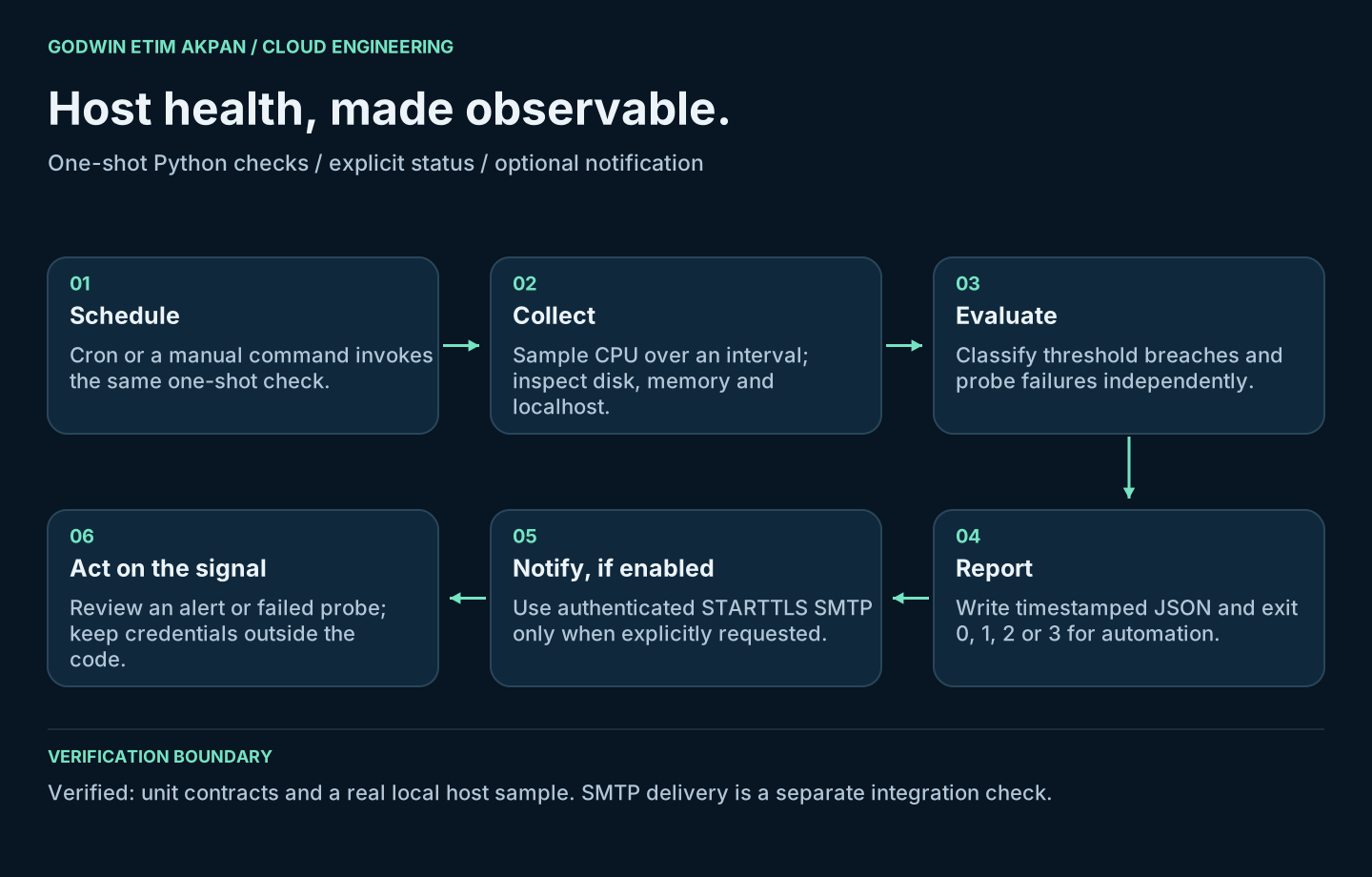
01 / The question
How can a small host monitor fail visibly?
Scheduled checks are useful only when their own failures are observable. This project separates measurement, evaluation, reporting and notification so a failed DNS lookup or email connection cannot masquerade as a healthy system.
My contributionRebuilt the monitoring script, supplied the missing notification implementation, defined exit semantics and validated thresholds and failure paths.
02 / System walkthrough
From input to evidence.
The stages of the implementation and its verification boundary.
- 01
Collect a sample
Measure CPU over a positive interval, disk free percentage, available memory and localhost IPv4 resolution.
- 02
Keep failures visible
Capture errors per probe and continue collecting the remaining measurements.
- 03
Evaluate consistently
Treat CPU at or above its limit and disk or memory at or below their limits as alerts.
- 04
Report and notify
Write JSON every run. Email requires an explicit flag and credentials supplied through the environment.
03 / Engineering decisions
Why the implementation matters.
Errors have their own state
Exit 0 means healthy; 1 means a threshold or local-resolution alert; 2 means a probe failed; 3 means notification failed.
No hidden helper
The published SMTP implementation replaces the unavailable emails module. STARTTLS certificate verification precedes authentication.
A narrow DNS check
Resolving localhost checks local hostname configuration. It does not establish external DNS or internet availability.
04 / Results & interpretation
What the checks establish.
Executed unit checks and a real local host sample. SMTP transmission was not exercised.
Contract checks
11 passedTests cover threshold boundaries, probe failures, default notification behavior, SMTP sequencing and exit codes.
Real host run
Alert returnedThe corrected monitor detected low free disk space during a local sample. No email was sent.
Email integration
PreparedSMTP call ordering is tested with a mock; real delivery requires a separately configured and verified mail service.
05 / Scope & limitations
Scope & limitations.
- One-shot lab monitorNo alert deduplication, escalation, retention service or production availability guarantee is implemented.
- Environment-specific checksA successful local Windows sample does not establish Linux cron operation. Linux scheduling and SMTP delivery need their own checks.
- Point-in-time measurementsA short CPU interval and fixed memory threshold are demonstration settings, not a capacity-planning model.
06 / Next iteration
Where I would take it next.
The next technical priorities for this project.
Confirm the Linux integration
Run from the target virtual environment under cron and verify logs and exit handling.
Close the notification loop
Use a dedicated test mailbox, trigger a controlled alert and verify receipt before enabling routine notifications.
07 / Code & reproducibility
Explore the implementation.
Source, execution commands, verification reports and architecture are documented in the linked GitHub project.
- health_check.py — collection, evaluation, JSON reporting and optional SMTP
- test_health_check.py — failure and boundary contracts
- evidence/validation.json and local-tests.txt — executed checks
- evidence/host-run-summary.json — minimized summary of the local sample
Original architecture diagrams describe the implementation and its verification boundary. They are explanatory diagrams, not screenshots of a deployed system.